
1170 lines
92 KiB
Markdown
Executable File
1170 lines
92 KiB
Markdown
Executable File
SQLAlchemy ist eines der zentralen Datenbank-Tools im Python-Ökosystem. Es bietet sowohl ein mächtiges ORM als auch ein flexibles, SQL-nahes Core-API.
|
||
|
||
Im Folgenden:
|
||
|
||
1. Grundidee von SQLAlchemy
|
||
2. Abgrenzung zu verwandten Ansätzen/Frameworks
|
||
3. Welche Probleme SQLAlchemy löst
|
||
4. Typische Herausforderungen / Stolpersteine
|
||
5. Praxisnahe Beispiele (Core & ORM)
|
||
|
||
---
|
||
|
||
## 1. Grundsätzliche Idee von SQLAlchemy
|
||
|
||
### Zwei große Säulen: Core und [[ORM]]
|
||
|
||
**a) SQLAlchemy Core**
|
||
|
||
- Bietet ein **relationales Abstraktions-Framework** nahe an SQL.
|
||
- Du definierst Tabellen und baust SQL-Ausdrücke mit Python-Objekten, statt Strings zu schreiben.
|
||
- Fokus: **Kontrolle über SQL**, Portabilität zwischen Datenbanken, aber kein “Objekt-Graph” wie beim ORM.
|
||
|
||
Beispiel: Tabelle und Query mit Core:
|
||
|
||
```python
|
||
from sqlalchemy import create_engine, MetaData, Table, Column, Integer, String, select
|
||
|
||
engine = create_engine("sqlite:///example.db", echo=True)
|
||
metadata = MetaData()
|
||
|
||
users = Table(
|
||
"users",
|
||
metadata,
|
||
Column("id", Integer, primary_key=True),
|
||
Column("name", String),
|
||
Column("email", String),
|
||
)
|
||
|
||
metadata.create_all(engine)
|
||
|
||
with engine.connect() as conn:
|
||
# Insert
|
||
conn.execute(users.insert().values(name="Alice", email="alice@example.com"))
|
||
conn.commit()
|
||
|
||
# Select
|
||
stmt = select(users).where(users.c.name == "Alice")
|
||
result = conn.execute(stmt)
|
||
for row in result:
|
||
print(row.id, row.name, row.email)
|
||
```
|
||
|
||
**b) SQLAlchemy ORM**
|
||
|
||
- Setzt auf dem Core auf und bietet:
|
||
- **Objekt-Relationales Mapping**: Tabellen ↔ Python-Klassen.
|
||
- **Unit-of-Work / Session**: Änderungen an Objekten werden gesammelt und in Transaktionen geschrieben.
|
||
- Navigation über **Beziehungen** (z.B. `user.addresses` statt Joins manuell zu schreiben).
|
||
|
||
Beispiel: ORM-Modelle und Nutzung:
|
||
|
||
```python
|
||
from sqlalchemy import create_engine, Integer, String, ForeignKey
|
||
from sqlalchemy.orm import DeclarativeBase, Mapped, mapped_column, relationship, Session
|
||
|
||
engine = create_engine("sqlite:///example.db", echo=True)
|
||
|
||
|
||
class Base(DeclarativeBase):
|
||
pass
|
||
|
||
|
||
class User(Base):
|
||
__tablename__ = "users"
|
||
|
||
id: Mapped[int] = mapped_column(Integer, primary_key=True)
|
||
name: Mapped[str] = mapped_column(String)
|
||
email: Mapped[str] = mapped_column(String)
|
||
|
||
addresses: Mapped[list["Address"]] = relationship(back_populates="user")
|
||
|
||
|
||
class Address(Base):
|
||
__tablename__ = "addresses"
|
||
|
||
id: Mapped[int] = mapped_column(Integer, primary_key=True)
|
||
email_address: Mapped[str] = mapped_column(String)
|
||
user_id: Mapped[int] = mapped_column(ForeignKey("users.id"))
|
||
|
||
user: Mapped[User] = relationship(back_populates="addresses")
|
||
|
||
|
||
Base.metadata.create_all(engine)
|
||
|
||
# Arbeiten mit Objekten
|
||
with Session(engine) as session:
|
||
user = User(name="Bob", email="bob@example.com")
|
||
user.addresses.append(Address(email_address="bob@work.com"))
|
||
session.add(user)
|
||
session.commit()
|
||
|
||
# Query
|
||
bob = session.query(User).filter_by(name="Bob").first()
|
||
print(bob.email, [addr.email_address for addr in bob.addresses])
|
||
```
|
||
|
||
**Kernidee:**
|
||
SQLAlchemy bietet dir die Wahl:
|
||
|
||
- Du willst **präzises, datenbanknahes SQL**? Nimm **Core**.
|
||
- Du willst **Objekte** und **Abstraktion** über SQL? Nimm das **ORM** (intern nutzt es Core).
|
||
|
||
---
|
||
|
||
## 2. Abgrenzung zu ähnlichen Vorgehensweisen / Paketen / Paradigmen
|
||
|
||
### a) Raw SQL / DB-API (z.B. mit `psycopg2`, `sqlite3`)
|
||
|
||
- Du schreibst SQL-Strings direkt:
|
||
```python
|
||
import sqlite3
|
||
|
||
conn = sqlite3.connect("example.db")
|
||
cursor = conn.cursor()
|
||
cursor.execute("SELECT id, name FROM users WHERE name = ?", ("Alice",))
|
||
rows = cursor.fetchall()
|
||
```
|
||
- **Vorteile**:
|
||
- Vollständige Kontrolle, keine zusätzliche Abstraktion.
|
||
- Einfach für sehr kleine Projekte / Skripte.
|
||
- **Nachteile**:
|
||
- Manuelles Mappen in Python-Objekte.
|
||
- Kein einheitliches, portables Abstraktionslevel.
|
||
- Redundante String-SQLs; schwer wartbar bei großen Codebasen.
|
||
|
||
**SQLAlchemy Core** liegt hier zwischen „Raw SQL” und „ORM”:
|
||
- Bietet Typsicherheit (bis zu einem gewissen Grad), Query-Building, Portabilität.
|
||
- Keine Magic, aber viel Komfort.
|
||
|
||
### b) Andere ORMs (z.B. Django ORM, peewee, ponyORM)
|
||
|
||
**Django ORM:**
|
||
|
||
- Stark mit Django-Framework integriert, nicht generisch.
|
||
- Typisch: `Model.objects.filter(...)`.
|
||
- **SQLAlchemy vs Django ORM**:
|
||
- SQLAlchemy ist **Framework-agnostisch**, kann in [[FastAPI]], Flask, CLI-Skripten etc. genutzt werden.
|
||
- ORM-Funktionen sind **umfangreicher** (z.B. komplexes Relationship-Handling, polymorphe Mappings, etc.).
|
||
- Django ORM ist einfacher für typische Web-CRUD-Anwendungen, weniger flexibel bei exotischer DB-Logik.
|
||
|
||
**peewee, ponyORM etc.:**
|
||
|
||
- Meist leichtergewichtig, weniger boilerplate.
|
||
- Oft weniger mächtig in Sonderfällen (komplexe Joins, exotische DB-Features).
|
||
- SQLAlchemy ist tendenziell der „Power-User-Ansatz”: breit, tief, konfigurierbar.
|
||
|
||
### c) Active Record vs Data Mapper
|
||
|
||
- Viele ORMs (Rails ActiveRecord, Django) folgen dem **Active-Record-Pattern**:
|
||
- Das Model-Objekt kennt seine Datenzugriffe (`save()`, `delete()`).
|
||
- SQLAlchemy ORM folgt eher dem **Data-Mapper-Pattern**:
|
||
- Domain-Objekte sind relativ „rein“.
|
||
- Persistenz wird über die Session/Mapper hergestellt.
|
||
- Folge: stärkere **Trennung von Domänenlogik und Persistence** – gut für komplexe Business-Logik.
|
||
|
||
---
|
||
|
||
## 3. Welche Probleme werden gelöst?
|
||
|
||
### a) Impedance Mismatch: Objektwelt vs Relationale Welt
|
||
|
||
- Python: Objekte, Vererbung, Beziehungen über Attribute/Listen.
|
||
- Datenbank: Tabellen, Fremdschlüssel, Joins, Normalisierung.
|
||
|
||
SQLAlchemy ORM löst u.a.:
|
||
|
||
- **Mapping von Tabellen auf Klassen**
|
||
- **Mapping von Zeilen auf Objekte**
|
||
- **Beziehungen als Python-Attribute** (`user.addresses` statt manueller Join).
|
||
- **Vererbung**: Single-Table-Inheritance, Joined-Table-Inheritance etc.
|
||
|
||
Beispiel-Vererbung (Joined-Table):
|
||
|
||
```python
|
||
class Employee(Base):
|
||
__tablename__ = "employees"
|
||
id: Mapped[int] = mapped_column(primary_key=True)
|
||
name: Mapped[str] = mapped_column(String)
|
||
type: Mapped[str] = mapped_column(String) # Discriminator
|
||
|
||
__mapper_args__ = {
|
||
"polymorphic_on": type,
|
||
"polymorphic_identity": "employee",
|
||
}
|
||
|
||
|
||
class Manager(Employee):
|
||
__tablename__ = "managers"
|
||
id: Mapped[int] = mapped_column(ForeignKey("employees.id"), primary_key=True)
|
||
department: Mapped[str] = mapped_column(String)
|
||
|
||
__mapper_args__ = {"polymorphic_identity": "manager"}
|
||
```
|
||
|
||
### b) Transaktionen und Unit-of-Work
|
||
|
||
- Die **Session** verwaltet ein Set von Objekten:
|
||
- Änderungen werden verfolgt (dirty tracking).
|
||
- `session.commit()` bündelt alles in einer Transaktion.
|
||
- Du musst nicht jede Insert/Update/Delete-Anweisung selbst schreiben.
|
||
|
||
Beispiel:
|
||
|
||
```python
|
||
with Session(engine) as session:
|
||
user = session.get(User, 1)
|
||
user.email = "new@example.com" # Änderung am Objekt
|
||
session.commit() # ORM generiert UPDATE users SET email=... WHERE id=1
|
||
```
|
||
|
||
### c) Portabilität zwischen Datenbanken
|
||
|
||
- Einmal definierte Modelle funktionieren (meistens) auf SQLite, PostgreSQL, MySQL, Oracle usw.
|
||
- Migration von einer DB-Engine zur anderen ist deutlich einfacher, solange du SQL-Standard-Funktionalitäten nutzt.
|
||
- Im Zusammenspiel mit **Alembic** (Migrations-Tool von SQLAlchemy) sind Schema-Änderungen integrierbar.
|
||
|
||
### d) Komplexe Queries in kontrollierbarer Form
|
||
|
||
- SQLAlchemy Core/ORM erlaubt den **systematischen Aufbau** von SQL-Ausdrücken:
|
||
- Zusammensetzen von Filtern / Joins / Subqueries abhängig von Parametern zur Laufzeit.
|
||
- Vermeidet Fehler bei String-SQL-Konkatenation.
|
||
|
||
Beispiel: dynamischer Query-Aufbau mit ORM:
|
||
|
||
```python
|
||
from sqlalchemy import select, or_
|
||
|
||
def search_users(session: Session, name=None, email=None):
|
||
stmt = select(User)
|
||
conditions = []
|
||
if name:
|
||
conditions.append(User.name.ilike(f"%{name}%"))
|
||
if email:
|
||
conditions.append(User.email.ilike(f"%{email}%"))
|
||
|
||
if conditions:
|
||
stmt = stmt.where(or_(*conditions))
|
||
|
||
return session.scalars(stmt).all()
|
||
```
|
||
|
||
---
|
||
|
||
## 4. Herausforderungen und typische Stolpersteine
|
||
|
||
### a) Lernkurve und Komplexität
|
||
|
||
- SQLAlchemy ist **umfangreich**:
|
||
- Core, ORM, Mappings, Loader-Options, Eager/Lazy Loading, Events, etc.
|
||
- Für einfache CRUD-Apps wirkt es am Anfang „overkill“.
|
||
- Viele Wege führen zum Ziel (Core vs ORM, Declarative vs klassische Mappings, Query-APIs).
|
||
|
||
**Praxis-Tipp:**
|
||
Für neue Projekte:
|
||
- Starte mit **Declarative ORM** und einfachen Patterns.
|
||
- Lern bei Bedarf zusätzlich Core für spezielle SQL-Fälle.
|
||
|
||
### b) Session-Management und Lebenszyklus
|
||
|
||
Falscher Umgang mit Sessions ist eine häufige Fehlerquelle:
|
||
|
||
- Zu lange lebende Sessions, die viele Objekte halten → hoher Memory-Footprint.
|
||
- Session in Web-Apps:
|
||
- Typischer Pattern: **“Session-per-request”**:
|
||
- Am Anfang eines Requests Session erstellen.
|
||
- Am Ende commit/rollback und schließen.
|
||
|
||
Beispiel mit [[FastAPI]]:
|
||
|
||
```python
|
||
from fastapi import Depends, FastAPI
|
||
from sqlalchemy.orm import Session
|
||
|
||
app = FastAPI()
|
||
|
||
def get_session():
|
||
with Session(engine) as session:
|
||
yield session
|
||
|
||
@app.get("/users/{user_id}")
|
||
def read_user(user_id: int, session: Session = Depends(get_session)):
|
||
return session.get(User, user_id)
|
||
```
|
||
|
||
### c) Lazy Loading vs Eager Loading
|
||
|
||
- Beziehungen sind per Default oft **lazy geladen**:
|
||
- Zugriff auf `user.addresses` löst eine neue Query aus.
|
||
- Probleme:
|
||
- In Schleifen kann das zu **N+1 Query Problem** führen.
|
||
- Lösung:
|
||
- Eager Loading über Optionen (`joinedload`, `selectinload`).
|
||
|
||
Beispiel Eager Loading:
|
||
|
||
```python
|
||
from sqlalchemy.orm import joinedload
|
||
|
||
with Session(engine) as session:
|
||
users = (
|
||
session.query(User)
|
||
.options(joinedload(User.addresses))
|
||
.all()
|
||
)
|
||
|
||
# Kein weiterer Query für .addresses nötig
|
||
for user in users:
|
||
print(user.name, len(user.addresses))
|
||
```
|
||
|
||
### d) Performance-Tuning
|
||
|
||
- ORM-Komfort kann SQL „verstecken“ – was gut und schlecht sein kann:
|
||
- Es können ineffiziente Queries entstehen, ohne dass du es sofort merkst.
|
||
- Tools:
|
||
- `echo=True` im Engine zum SQL-Loggen.
|
||
- Profiler, EXPLAIN-Analyse in der DB.
|
||
- Manchmal ist es besser, für komplexe Performance-kritische Queries:
|
||
- **Explizites Core-Statement** oder sogar **Raw SQL** zu verwenden.
|
||
|
||
### e) Migrations / Schema-Änderungen
|
||
|
||
- SQLAlchemy selbst bietet **keine Migrationen**, das ist die Aufgabe von **Alembic**.
|
||
- Herausforderung:
|
||
- Konsistentes Management von Modellen (Python) und Schema (DB).
|
||
- Migration-Skripte schreiben, testen, deployen.
|
||
|
||
Trotzdem ist das Zusammenspiel SQLAlchemy + Alembic ein de-facto Standard in vielen Projekten.
|
||
|
||
---
|
||
|
||
## 5. Praxisnahe Beispiele
|
||
|
||
### a) Typisches Setup in einer kleinen Web-Anwendung
|
||
|
||
Struktur:
|
||
- `database.py` – Engine und Session-Factory
|
||
- `models.py` – ORM-Modelle
|
||
- `crud.py` – Datenbank-Operationen
|
||
- `main.py` – FastAPI/Flask-Endpoints
|
||
|
||
`database.py`:
|
||
|
||
```python
|
||
from sqlalchemy import create_engine
|
||
from sqlalchemy.orm import sessionmaker
|
||
|
||
DATABASE_URL = "sqlite:///./app.db"
|
||
|
||
engine = create_engine(DATABASE_URL, echo=False, future=True)
|
||
SessionLocal = sessionmaker(bind=engine, autoflush=False, autocommit=False)
|
||
```
|
||
|
||
`models.py`:
|
||
|
||
```python
|
||
from sqlalchemy.orm import DeclarativeBase, Mapped, mapped_column
|
||
from sqlalchemy import Integer, String
|
||
|
||
class Base(DeclarativeBase):
|
||
pass
|
||
|
||
class User(Base):
|
||
__tablename__ = "users"
|
||
|
||
id: Mapped[int] = mapped_column(Integer, primary_key=True, index=True)
|
||
name: Mapped[str] = mapped_column(String, index=True)
|
||
email: Mapped[str] = mapped_column(String, unique=True, index=True)
|
||
```
|
||
|
||
`crud.py`:
|
||
|
||
```python
|
||
from sqlalchemy.orm import Session
|
||
from .models import User
|
||
|
||
def get_user_by_email(db: Session, email: str) -> User | None:
|
||
return db.query(User).filter(User.email == email).first()
|
||
|
||
def create_user(db: Session, name: str, email: str) -> User:
|
||
user = User(name=name, email=email)
|
||
db.add(user)
|
||
db.commit()
|
||
db.refresh(user)
|
||
return user
|
||
```
|
||
|
||
`main.py` (FastAPI):
|
||
|
||
```python
|
||
from fastapi import FastAPI, Depends
|
||
from sqlalchemy.orm import Session
|
||
from .database import SessionLocal, engine
|
||
from .models import Base
|
||
from . import crud
|
||
|
||
app = FastAPI()
|
||
Base.metadata.create_all(bind=engine)
|
||
|
||
def get_db():
|
||
db = SessionLocal()
|
||
try:
|
||
yield db
|
||
finally:
|
||
db.close()
|
||
|
||
@app.post("/users/")
|
||
def create_user(name: str, email: str, db: Session = Depends(get_db)):
|
||
return crud.create_user(db, name, email)
|
||
|
||
@app.get("/users/{email}")
|
||
def read_user(email: str, db: Session = Depends(get_db)):
|
||
return crud.get_user_by_email(db, email)
|
||
```
|
||
|
||
### b) Mischung aus Core und ORM
|
||
|
||
Beispiel: Du nutzt ORM-Models, aber für eine bestimmte, komplexe Aggregation lieber Core:
|
||
|
||
```python
|
||
from sqlalchemy import select, func
|
||
from sqlalchemy.orm import Session
|
||
from .models import User
|
||
|
||
def count_users_by_first_letter(db: Session):
|
||
stmt = (
|
||
select(func.substr(User.name, 1, 1).label("initial"), func.count())
|
||
.group_by("initial")
|
||
.order_by("initial")
|
||
)
|
||
return db.execute(stmt).all()
|
||
```
|
||
|
||
---
|
||
|
||
## Zusammenfassung
|
||
|
||
- **Grundidee:**
|
||
SQLAlchemy ist ein flexibles Toolkit, das sowohl eine SQL-nahe Abstraktion (Core) als auch ein mächtiges ORM (Data-Mapper-basiert) bereitstellt. Es überbrückt den Graben zwischen Objektwelt (Python) und relationalen Datenbanken.
|
||
|
||
- **Abgrenzung:**
|
||
Im Vergleich zu Raw SQL: mehr Komfort, Typsicherheit, Portabilität.
|
||
Im Vergleich zu anderen ORMs: framework-agnostisch, sehr flexibel, eher für komplexere Anforderungen optimiert.
|
||
|
||
- **Gelöste Probleme:**
|
||
Objekt-relationales Mapping, Transaktionsverwaltung (Unit-of-Work), DB-Portabilität, systematischer Query-Aufbau, Integration mit Migrations-Tooling (Alembic).
|
||
|
||
- **Herausforderungen:**
|
||
Relativ hohe Lernkurve, Session-Handling, Lazy/Eager Loading, Performance-Tuning, Zusammenspiel mit Migrationen.
|
||
# # Data Management With Python, SQLite, and SQLAlchemy
|
||
[Data Management With Python, SQLite, and SQLAlchemy – Real Python](https://realpython.com/python-sqlite-sqlalchemy/)
|
||
|
||
All programs process data in one form or another, and many need to be able to save and retrieve that data from one invocation to the next. Python, [SQLite](https://www.sqlite.org/index.html), and [SQLAlchemy](https://www.sqlalchemy.org/) give your programs database functionality, allowing you to store data in a single file without the need for a database server.
|
||
|
||
You can achieve similar results using [flat files](https://en.wikipedia.org/wiki/Flat-file_database) in any number of formats, including CSV, JSON, XML, and even custom formats. Flat files are often human-readable text files—though they can also be binary data—with a structure that can be parsed by a computer program. Below, you’ll explore using SQL databases and flat files for data storage and manipulation and learn how to decide which approach is right for your program.
|
||
|
||
**In this tutorial, you’ll learn how to use:**
|
||
|
||
- **Flat files** for data storage
|
||
- **SQL** to improve access to persistent data
|
||
- **SQLite** for data storage
|
||
- **SQLAlchemy** to work with data as Python objects
|
||
|
||
You can get all of the code and data you’ll see in this tutorial by clicking on the link below:
|
||
|
||
**Download the sample code:** [Click here to get the code you’ll use](https://realpython.com/bonus/sqlite-sqlalchemy-code/) to learn about data management with SQLite and SQLAlchemy in this tutorial.
|
||
|
||
## Using Flat Files for Data Storage[](https://realpython.com/python-sqlite-sqlalchemy/#using-flat-files-for-data-storage "Permanent link")
|
||
|
||
A **flat file** is a file containing data with no internal hierarchy and usually no references to external files. Flat files contain human-readable characters and are very useful for creating and reading data. Because they don’t have to use fixed field widths, flat files often use other structures to make it possible for a program to parse text.
|
||
|
||
For example, [comma-separated value (CSV)](https://realpython.com/python-csv/) files are lines of plain text in which the comma character separates the data elements. Each line of text represents a row of data, and each comma-separated value is a field within that row. The comma character delimiter indicates the boundary between data values.
|
||
|
||
Python excels at [reading from and saving to files](https://realpython.com/read-write-files-python/). Being able to read data files with Python allows you to restore an application to a useful state when you rerun it at a later time. Being able to save data in a file allows you to share information from the program between users and sites where the application runs.
|
||
|
||
Before a program can read a data file, it has to be able to understand the data. Usually, this means the data file needs to have some structure that the application can use to read and parse the text in the file.
|
||
|
||
Below is a CSV file named `author_book_publisher.csv`, used by the first example program in this tutorial:
|
||
|
||
`first_name,last_name,title,publisher Isaac,Asimov,Foundation,Random House Pearl,Buck,The Good Earth,Random House Pearl,Buck,The Good Earth,Simon & Schuster Tom,Clancy,The Hunt For Red October,Berkley Tom,Clancy,Patriot Games,Simon & Schuster Stephen,King,It,Random House Stephen,King,It,Penguin Random House Stephen,King,Dead Zone,Random House Stephen,King,The Shining,Penguin Random House John,Le Carre,"Tinker, Tailor, Soldier, Spy: A George Smiley Novel",Berkley Alex,Michaelides,The Silent Patient,Simon & Schuster Carol,Shaben,Into The Abyss,Simon & Schuster`
|
||
|
||
The first line provides a comma-separated list of fields, which are the column names for the data that follows in the remaining lines. The rest of the lines contain the data, with each line representing a single record.
|
||
|
||
**Note:** Though the authors, books, and publishers are all real, the relationships between books and publishers are fictional and were created for the purposes of this tutorial.
|
||
|
||
Next, you’ll take a look at some of the advantages and disadvantages of using flat files like the above CSV to work with your data.
|
||
|
||
[Remove ads](https://realpython.com/account/join/)
|
||
|
||
### Advantages of Flat Files[](https://realpython.com/python-sqlite-sqlalchemy/#advantages-of-flat-files "Permanent link")
|
||
|
||
Working with data in flat files is manageable and straightforward to implement. Having the data in a human-readable format is helpful not only for creating the data file with a text editor but also for examining the data and looking for any inconsistencies or problems.
|
||
|
||
Many applications can export flat-file versions of the data generated by the file. For example, [Excel](https://realpython.com/openpyxl-excel-spreadsheets-python/) can import or export a CSV file to and from a spreadsheet. Flat files also have the advantage of being self-contained and transferable if you want to share the data.
|
||
|
||
Almost every programming language has tools and libraries that make working with CSV files easier. Python has the built-in `csv` module and the powerful [pandas](https://realpython.com/pandas-read-write-files/) module available, making working with CSV files a potent solution.
|
||
|
||
### Disadvantages of Flat Files[](https://realpython.com/python-sqlite-sqlalchemy/#disadvantages-of-flat-files "Permanent link")
|
||
|
||
The advantages of working with flat files start to diminish as the data becomes larger. Large files are still human-readable, but editing them to create data or look for problems becomes a more difficult task. If your application will change the data in the file, then one solution would be to [read the entire file into memory](https://realpython.com/read-write-files-python/), make the changes, and write the data out to another file.
|
||
|
||
Another problem with using flat files is that you’ll need to explicitly create and maintain any relationships between parts of your data and the application program within the file syntax. Additionally, you’ll need to generate code in your application to use those relationships.
|
||
|
||
A final complication is that people you want to share your data file with will also need to know about and act on the structures and relationships you’ve created in the data. To access the information, those users will need to understand not only the structure of the data but also the programming tools necessary for accessing it.
|
||
|
||
### Flat File Example[](https://realpython.com/python-sqlite-sqlalchemy/#flat-file-example "Permanent link")
|
||
|
||
The example program `examples/example_1/main.py` uses the `author_book_publisher.csv` file to get the data and relationships in it. This CSV file maintains a list of authors, the books they’ve published, and the publishers for each of the books.
|
||
|
||
**Note:** The data files used in the examples are available in the `project/data` directory. There’s also a program file in the `project/build_data` directory that generates the data. That application is useful if you change the data and want to get back to a known state.
|
||
|
||
To get access to the data files used in this section and throughout the tutorial, click on the link below:
|
||
|
||
**Download the sample code:** [Click here to get the code you’ll use](https://realpython.com/bonus/sqlite-sqlalchemy-code/) to learn about data management with SQLite and SQLAlchemy in this tutorial.
|
||
|
||
The CSV file presented above is a pretty small data file containing only a few authors, books, and publishers. You should also notice some things about the data:
|
||
|
||
- The authors Stephen King and Tom Clancy appear more than once because multiple books they’ve published are represented in the data.
|
||
|
||
- The authors Stephen King and Pearl Buck have the same book published by more than one publisher.
|
||
|
||
|
||
These duplicated data fields create relationships between other parts of the data. One author can write many books, and one publisher can work with multiple authors. Authors and publishers share relationships with individual books.
|
||
|
||
The relationships in the `author_book_publisher.csv` file are represented by fields that appear multiple times in different rows of the data file. Because of this data redundancy, the data represents more than a single two-dimensional table. You’ll see more of this when you use the file to create an SQLite database file.
|
||
|
||
The example program `examples/example_1/main.py` uses the relationships embedded in the `author_book_publisher.csv` file to generate some data. It first presents a list of the authors and the number of books each has written. It then shows a list of publishers and the number of authors for which each has published books.
|
||
|
||
It also uses the [`treelib`](https://treelib.readthedocs.io/en/latest/) module to display a tree hierarchy of the authors, books , and publishers.
|
||
|
||
Lastly, it adds a new book to the data and redisplays the tree hierarchy with the new book in place. Here’s the [`main()`](https://realpython.com/courses/python-main-function/) entry-point function for this program:
|
||
|
||
`def main(): """The main entry point of the program""" # Get the resources for the program with resources.path( "project.data", "author_book_publisher.csv" ) as filepath: data = get_data(filepath) # Get the number of books printed by each publisher books_by_publisher = get_books_by_publisher(data, ascending=False) for publisher, total_books in books_by_publisher.items(): print(f"Publisher: {publisher}, total books: {total_books}") print() # Get the number of authors each publisher publishes authors_by_publisher = get_authors_by_publisher(data, ascending=False) for publisher, total_authors in authors_by_publisher.items(): print(f"Publisher: {publisher}, total authors: {total_authors}") print() # Output hierarchical authors data output_author_hierarchy(data) # Add a new book to the data structure data = add_new_book( data, author_name="Stephen King", book_title="The Stand", publisher_name="Random House", ) # Output the updated hierarchical authors data output_author_hierarchy(data)`
|
||
|
||
The Python code above takes the following steps:
|
||
|
||
- **Lines 4 to 7** read the `author_book_publisher.csv` file into a pandas DataFrame.
|
||
- **Lines 10 to 13** print the number of books published by each publisher.
|
||
- **Lines 16 to 19** print the number of authors associated with each publisher.
|
||
- **Line 22** outputs the book data as a hierarchy sorted by authors.
|
||
- **Lines 25 to 30** add a new book to the in-memory structure.
|
||
- **Line 33** outputs the book data as a hierarchy sorted by authors, including the newly added book.
|
||
|
||
Running this program generates the following output:
|
||
|
||
`$ python main.py Publisher: Simon & Schuster, total books: 4 Publisher: Random House, total books: 4 Publisher: Penguin Random House, total books: 2 Publisher: Berkley, total books: 2 Publisher: Simon & Schuster, total authors: 4 Publisher: Random House, total authors: 3 Publisher: Berkley, total authors: 2 Publisher: Penguin Random House, total authors: 1 Authors ├── Alex Michaelides │ └── The Silent Patient │ └── Simon & Schuster ├── Carol Shaben │ └── Into The Abyss │ └── Simon & Schuster ├── Isaac Asimov │ └── Foundation │ └── Random House ├── John Le Carre │ └── Tinker, Tailor, Soldier, Spy: A George Smiley Novel │ └── Berkley ├── Pearl Buck │ └── The Good Earth │ ├── Random House │ └── Simon & Schuster ├── Stephen King │ ├── Dead Zone │ │ └── Random House │ ├── It │ │ ├── Penguin Random House │ │ └── Random House │ └── The Shining │ └── Penguin Random House └── Tom Clancy ├── Patriot Games │ └── Simon & Schuster └── The Hunt For Red October └── Berkley`
|
||
|
||
The author hierarchy above is presented twice in the output, with the addition of Stephen King’s _The Stand_, published by Random House. The actual output above has been edited and shows only the first hierarchy output to save space.
|
||
|
||
`main()` calls other functions to perform the bulk of the work. The first function it calls is `get_data()`:
|
||
|
||
`def get_data(filepath): """Get book data from the csv file""" return pd.read_csv(filepath)`
|
||
|
||
This function takes in the file path to the CSV file and uses pandas to read it into a [pandas DataFrame](https://realpython.com/pandas-dataframe/), which it then passes back to the caller. The return value of this function becomes the data structure passed to the other functions that make up the program.
|
||
|
||
`get_books_by_publisher()` calculates the number of books published by each publisher. The resulting pandas [Series](https://realpython.com/pandas-python-explore-dataset/#understanding-series-objects) uses the pandas [GroupBy](https://realpython.com/pandas-groupby/) functionality to group by publisher and then [sort](https://realpython.com/pandas-sort-python/) based on the `ascending` flag:
|
||
|
||
`def get_books_by_publisher(data, ascending=True): """Return the number of books by each publisher as a pandas series""" return data.groupby("publisher").size().sort_values(ascending=ascending)`
|
||
|
||
`get_authors_by_publisher()` does essentially the same thing as the previous function, but for authors:
|
||
|
||
`def get_authors_by_publisher(data, ascending=True): """Returns the number of authors by each publisher as a pandas series""" return ( data.assign(name=data.first_name.str.cat(data.last_name, sep=" ")) .groupby("publisher") .nunique() .loc[:, "name"] .sort_values(ascending=ascending) )`
|
||
|
||
`add_new_book()` creates a new book in the pandas DataFrame. The code checks to see if the author, book, or publisher already exists. If not, then it creates a new book and appends it to the pandas DataFrame:
|
||
|
||
`def add_new_book(data, author_name, book_title, publisher_name): """Adds a new book to the system""" # Does the book exist? first_name, _, last_name = author_name.partition(" ") if any( (data.first_name == first_name) & (data.last_name == last_name) & (data.title == book_title) & (data.publisher == publisher_name) ): return data # Add the new book return data.append( { "first_name": first_name, "last_name": last_name, "title": book_title, "publisher": publisher_name, }, ignore_index=True, )`
|
||
|
||
`output_author_hierarchy()` uses nested [`for` loops](https://realpython.com/python-for-loop/) to iterate through the levels of the data structure. It then uses the `treelib` module to output a hierarchical listing of the authors, the books they’ve published, and the publishers who’ve published those books:
|
||
|
||
`def output_author_hierarchy(data): """Output the data as a hierarchy list of authors""" authors = data.assign( name=data.first_name.str.cat(data.last_name, sep=" ") ) authors_tree = Tree() authors_tree.create_node("Authors", "authors") for author, books in authors.groupby("name"): authors_tree.create_node(author, author, parent="authors") for book, publishers in books.groupby("title")["publisher"]: book_id = f"{author}:{book}" authors_tree.create_node(book, book_id, parent=author) for publisher in publishers: authors_tree.create_node(publisher, parent=book_id) # Output the hierarchical authors data authors_tree.show()`
|
||
|
||
This application works well and illustrates the power available to you with the pandas module. The module provides excellent functionality for reading a CSV file and interacting with the data.
|
||
|
||
Let’s push on and create an identically functioning program using Python, an SQLite database version of the author and publication data, and SQLAlchemy to interact with that data.
|
||
|
||
[Remove ads](https://realpython.com/account/join/)
|
||
|
||
## Using SQLite to Persist Data[](https://realpython.com/python-sqlite-sqlalchemy/#using-sqlite-to-persist-data "Permanent link")
|
||
|
||
As you saw earlier, there’s redundant data in the `author_book_publisher.csv` file. For example, all information about Pearl Buck’s _The Good Earth_ is listed twice because two different publishers have published the book.
|
||
|
||
Imagine if this data file contained more related data, like the author’s address and phone number, publication dates and ISBNs for books, or addresses, phone numbers, and perhaps yearly revenue for publishers. This data would be duplicated for each root data item, like author, book, or publisher.
|
||
|
||
It’s possible to create data this way, but it would be exceptionally unwieldy. Think about the problems keeping this data file current. What if [Stephen King wanted to change his name](https://en.wikipedia.org/wiki/Richard_Bachman)? You’d have to update multiple records containing his name and make sure there were no typos.
|
||
|
||
Worse than the data duplication would be the complexity of adding other relationships to the data. What if you decided to add phone numbers for the authors, and they had phone numbers for home, work, mobile, and perhaps more? Every new relationship that you’d want to add for any root item would multiply the number of records by the number of items in that new relationship.
|
||
|
||
This problem is one reason that relationships exist in database systems. An important topic in database engineering is **database normalization**, or the process of breaking apart data to reduce redundancy and increase integrity. When a database structure is extended with new types of data, having it normalized beforehand keeps changes to the existing structure to a minimum.
|
||
|
||
The SQLite database is available in Python, and according to the [SQLite home page](https://www.sqlite.org/index.html), it’s used more than all other database systems combined. It offers a full-featured [relational database management system (RDBMS)](https://en.wikipedia.org/wiki/Relational_database#Relations_or_tables) that works with a single file to maintain all the database functionality.
|
||
|
||
It also has the advantage of not requiring a separate database server to function. The database file format is cross-platform and accessible to any programming language that supports SQLite.
|
||
|
||
All of this is interesting information, but how is it relevant to the use of flat files for data storage? You’ll find out below!
|
||
|
||
### Creating a Database Structure[](https://realpython.com/python-sqlite-sqlalchemy/#creating-a-database-structure "Permanent link")
|
||
|
||
The brute force approach to getting the `author_book_publisher.csv` data into an SQLite database would be to create a single table matching the structure of the CSV file. Doing this would ignore a good deal of SQLite’s power.
|
||
|
||
**Relational databases** provide a way to store structured data in tables and establish relationships between those tables. They usually use [Structured Query Language (SQL)](https://en.wikipedia.org/wiki/SQL) as the primary way to interact with the data. This is an oversimplification of what RDBMSs provide, but it’s sufficient for the purposes of this tutorial.
|
||
|
||
An SQLite database provides support for interacting with the data table using SQL. Not only does an SQLite database file contain the data, but it also has a standardized way to interact with the data. This support is embedded in the file, meaning that any programming language that can use an SQLite file can also use SQL to work with it.
|
||
|
||
### Interacting With a Database With SQL[](https://realpython.com/python-sqlite-sqlalchemy/#interacting-with-a-database-with-sql "Permanent link")
|
||
|
||
SQL is a **declarative language** used to create, manage, and query the data contained in a database. A declarative language describes _what_ is to be accomplished rather than _how_ it should be accomplished. You’ll see examples of SQL statements later when you get to creating database tables.
|
||
|
||
## Structuring a Database With SQL[](https://realpython.com/python-sqlite-sqlalchemy/#structuring-a-database-with-sql "Permanent link")
|
||
|
||
To take advantage of the power in SQL, you’ll need to apply some database normalization to the data in the `author_book_publisher.csv` file. To do this, you’ll separate the authors, books, and publishers into separate database tables.
|
||
|
||
Conceptually, data is stored in the database in two-dimensional table structures. Each table consists of rows of **records**, and each record consists of columns, or **fields**, containing data.
|
||
|
||
The data contained in the fields is of pre-defined types, including text, [integers, floats](https://realpython.com/python-numbers/#integers-and-floating-point-numbers), and more. CSV files are different because all the fields are text and must be parsed by a program to have a data type assigned to them.
|
||
|
||
Each record in the table has a **primary key** defined to give a record a unique identifier. The primary key is similar to the key in a [Python dictionary](https://realpython.com/python-dicts/). The database engine itself often generates the primary key as an incrementing integer value for every record inserted into the database table.
|
||
|
||
Though the primary key is often automatically generated by the database engine, it doesn’t have to be. If the data stored in a field is unique across all other data in the table in that field, then it can be the primary key. For example, a table containing data about books could use the book’s ISBN as the primary key.
|
||
|
||
[Remove ads](https://realpython.com/account/join/)
|
||
|
||
### Creating Tables With SQL[](https://realpython.com/python-sqlite-sqlalchemy/#creating-tables-with-sql "Permanent link")
|
||
|
||
Here’s how you can create the three tables representing the authors, books, and publishers in the CSV file using SQL statements:
|
||
|
||
`CREATE TABLE author ( author_id INTEGER NOT NULL PRIMARY KEY, first_name VARCHAR, last_name VARCHAR ); CREATE TABLE book ( book_id INTEGER NOT NULL PRIMARY KEY, author_id INTEGER REFERENCES author, title VARCHAR ); CREATE TABLE publisher ( publisher_id INTEGER NOT NULL PRIMARY KEY, name VARCHAR );`
|
||
|
||
Notice there are no file operations, no variables created, and no structures to hold them. The statements describe only the desired result: the creation of a table with particular attributes. The database engine determines how to do this.
|
||
|
||
Once you’ve created and populated this table with author data from the `author_book_publisher.csv` file, you can access it using SQL statements. The following statement (also called a **query**) uses the wildcard character (`*`) to get all the data in the `author` table and output it:
|
||
|
||
`SELECT * FROM author;`
|
||
|
||
You can use the [`sqlite3`](https://sqlite.org/cli.html) command-line tool to interact with the `author_book_publisher.db` database file in the `project/data` directory:
|
||
|
||
`$ sqlite3 author_book_publisher.db`
|
||
|
||
Once the SQLite command-line tool is running with the database open, you can enter SQL commands. Here’s the above SQL command and its output, followed by the `.q` command to exit the program:
|
||
|
||
`sqlite> SELECT * FROM author; 1|Isaac|Asimov 2|Pearl|Buck 3|Tom|Clancy 4|Stephen|King 5|John|Le Carre 6|Alex|Michaelides 7|Carol|Shaben sqlite> .q`
|
||
|
||
Notice that each author exists only once in the table. Unlike the CSV file, which had multiple entries for some of the authors, here, only one unique record per author is necessary.
|
||
|
||
### Maintaining a Database With SQL[](https://realpython.com/python-sqlite-sqlalchemy/#maintaining-a-database-with-sql "Permanent link")
|
||
|
||
SQL provides ways to work with existing databases and tables by inserting new data and updating or deleting existing data. Here’s an example SQL statement for inserting a new author into the `author` table:
|
||
|
||
`INSERT INTO author (first_name, last_name) VALUES ('Paul', 'Mendez');`
|
||
|
||
This SQL statement inserts the values ‘`Paul`’ and ‘`Mendez`’ into the respective columns `first_name` and `last_name` of the `author` table.
|
||
|
||
Notice that the `author_id` column isn’t specified. Because that column is the primary key, the database engine generates the value and inserts it as part of the statement execution.
|
||
|
||
Updating records in a database table is an uncomplicated process. For instance, suppose Stephen King wanted to be known by his pen name, Richard Bachman. Here’s an the SQL statement to update the database record:
|
||
|
||
`UPDATE author SET first_name = 'Richard', last_name = 'Bachman' WHERE first_name = 'Stephen' AND last_name = 'King';`
|
||
|
||
The SQL statement locates the single record for `'Stephen King'` using the conditional statement `WHERE first_name = 'Stephen' AND last_name = 'King'` and then updates the `first_name` and `last_name` fields with the new values. SQL uses the equals sign (`=`) as both the comparison operator and [assignment operator](https://realpython.com/python-assignment-operator/).
|
||
|
||
You can also delete records from a database. Here’s an example SQL statement to delete a record from the `author` table:
|
||
|
||
`DELETE FROM author WHERE first_name = 'Paul' AND last_name = 'Mendez';`
|
||
|
||
This SQL statement deletes a single row from the `author` table where the `first_name` is equal to `'Paul'` and the `last_name` is equal to `'Mendez'`.
|
||
|
||
Be careful when deleting records! The conditions you set must be as specific as possible. A conditional that’s too broad can lead to deleting more records than you intend. For example, if the condition were based only on the line `first_name = 'Paul'`, then all authors with a first name of Paul would be deleted from the database.
|
||
|
||
**Note:** To avoid the accidental deletion of records, many applications don’t allow deletions at all. Instead, the record has another column to indicate if it’s in use or not. This column might be named `active` and contain a value that evaluates to either True or False, indicating whether the record should be included when querying the database.
|
||
|
||
For example, the SQL query below would get all columns for all active records in `some_table`:
|
||
|
||
`SELECT * FROM some_table WHERE active = 1;`
|
||
|
||
SQLite doesn’t have a [Boolean data type](https://realpython.com/python-boolean/), so the `active` column is represented by an integer with a value of `0` or `1` to indicate the state of the record. Other database systems may or may not have native Boolean data types.
|
||
|
||
It’s entirely possible to build database applications in Python using SQL statements directly in the code. Doing so returns data to the application as a list of [lists](https://realpython.com/python-lists-tuples/) or list of [dictionaries](https://realpython.com/courses/dictionaries-python/).
|
||
|
||
Using raw SQL is a perfectly acceptable way to work with the data returned by queries to the database. However, rather than doing that, you’re going to move directly into using SQLAlchemy to work with databases.
|
||
|
||
[Remove ads](https://realpython.com/account/join/)
|
||
|
||
## Building Relationships[](https://realpython.com/python-sqlite-sqlalchemy/#building-relationships "Permanent link")
|
||
|
||
Another feature of database systems that you might find even more powerful and useful than data persistence and retrieval is **relationships**. Databases that support relationships allow you to break up data into multiple tables and establish connections between them.
|
||
|
||
The data in the `author_book_publisher.csv` file represents the data and relationships by duplicating data. A database handles this by breaking the data up into three tables—`author`, `book`, and `publisher`—and establishing relationships between them.
|
||
|
||
After getting all the data you want into one place in the CSV file, why would you want to break it up into multiple tables? Wouldn’t it be more work to create and put back together again? That’s true to an extent, but the advantages of breaking up the data and putting it back together using SQL could win you over!
|
||
|
||
### One-to-Many Relationships[](https://realpython.com/python-sqlite-sqlalchemy/#one-to-many-relationships "Permanent link")
|
||
|
||
A **one-to-many** relationship is like that of a customer ordering items online. One customer can have many orders, but each order belongs to one customer. The `author_book_publisher.db` database has a one-to-many relationship in the form of authors and books. Each author can write many books, but each book is written by one author.
|
||
|
||
As you saw in the table creation above, the implementation of these separate entities is to place each into a database table, one for authors and one for books. But how does the one-to-many relationship between these two tables get implemented?
|
||
|
||
Remember, each table in a database has a field designated as the primary key for that table. Each table above has a primary key field named using this pattern: `<table name>_id`.
|
||
|
||
The `book` table shown above contains a field, `author_id`, that references the `author` table. The `author_id` field establishes a one-to-many relationship between authors and books that looks like this:
|
||
|
||
[](https://files.realpython.com/media/author_book.e9c86f34967d.png)
|
||
|
||
The diagram above is a simple [entity-relationship diagram (ERD)](https://en.wikipedia.org/wiki/Entity%E2%80%93relationship_model) created with the [JetBrains DataGrip](https://www.jetbrains.com/datagrip/features/) application showing the tables `author` and `book` as boxes with their respective primary key and data fields. Two graphical items add information about the relationship:
|
||
|
||
1. **The small yellow and blue key icons** indicate the primary and foreign keys for the table, respectively.
|
||
|
||
2. **The arrow connecting `book` to `author`** indicates the relationship between the tables based on the `author_id` foreign key in the `book` table.
|
||
|
||
|
||
When you add a new book to the `book` table, the data includes an `author_id` value for an existing author in the `author` table. In this way, all the books written by an author have a lookup relationship back to that unique author.
|
||
|
||
Now that you have separate tables for authors and books, how do you use the relationship between them? SQL supports what’s called a [`JOIN`](https://realpython.com/python-sql-libraries/#join) operation, which you can use to tell the database how to connect two or more tables.
|
||
|
||
The SQL query below joins the `author` and `book` table together using the SQLite command-line application:
|
||
|
||
`sqlite> SELECT ...> a.first_name || ' ' || a.last_name AS author_name, ...> b.title AS book_title ...> FROM author a ...> JOIN book b ON b.author_id = a.author_id ...> ORDER BY a.last_name ASC; Isaac Asimov|Foundation Pearl Buck|The Good Earth Tom Clancy|The Hunt For Red October Tom Clancy|Patriot Games Stephen King|It Stephen King|Dead Zone Stephen King|The Shining John Le Carre|Tinker, Tailor, Soldier, Spy: A George Smiley Novel Alex Michaelides|The Silent Patient Carol Shaben|Into The Abyss`
|
||
|
||
The SQL query above gathers information from both the author and book table by joining the tables using the relationship established between the two. SQL [string concatenation](https://realpython.com/python-string-concatenation/) assigns the author’s full name to the alias `author_name`. The data gathered by the query are sorted in ascending order by the `last_name` field.
|
||
|
||
There are a few things to notice in the SQL statement. First, authors are presented by their full names in a single column and sorted by their last names. Also, authors appear in the output multiple times because of the one-to-many relationship. An author’s name is duplicated for each book they’ve written in the database.
|
||
|
||
By creating separate tables for authors and books and establishing the relationship between them, you’ve reduced redundancy in the data. Now you only have to edit an author’s data in one place, and that change appears in any SQL query accessing the data.
|
||
|
||
### Many-to-Many Relationships[](https://realpython.com/python-sqlite-sqlalchemy/#many-to-many-relationships "Permanent link")
|
||
|
||
**Many-to-many** relationships exist in the `author_book_publisher.db` database between authors and publishers as well as between books and publishers. One author can work with many publishers, and one publisher can work with many authors. Similarly, one book can be published by many publishers, and one publisher can publish many books.
|
||
|
||
Handling this situation in the database is more involved than a one-to-many relationship because the relationship goes both ways. Many-to-many relationships are created by an **association table** acting as a bridge between the two related tables.
|
||
|
||
The association table contains at least two foreign key fields, which are the primary keys of each of the two associated tables. This SQL statement creates the association table relating the `author` and `publisher` tables:
|
||
|
||
`CREATE TABLE author_publisher ( author_id INTEGER REFERENCES author, publisher_id INTEGER REFERENCES publisher );`
|
||
|
||
The SQL statements create a new `author_publisher` table referencing the primary keys of the existing `author` and `publisher` tables. The `author_publisher` table is an association table establishing relationships between an author and a publisher.
|
||
|
||
Because the relationship is between two primary keys, there’s no need to create a primary key for the association table itself. The combination of the two related keys creates a unique identifier for a row of data.
|
||
|
||
As before, you use the `JOIN` keyword to connect two tables together. Connecting the `author` table to the `publisher` table is a two-step process:
|
||
|
||
1. `JOIN` the `author` table with the `author_publisher` table.
|
||
2. `JOIN` the `author_publisher` table with the `publisher` table.
|
||
|
||
The `author_publisher` association table provides the bridge through which the `JOIN` connects the two tables. Here’s an example SQL query returning a list of authors and the publishers publishing their books:
|
||
|
||
`sqlite> SELECT ...> a.first_name || ' ' || a.last_name AS author_name, ...> p.name AS publisher_name ...> FROM author a ...> JOIN author_publisher ap ON ap.author_id = a.author_id ...> JOIN publisher p ON p.publisher_id = ap.publisher_id ...> ORDER BY a.last_name ASC; Isaac Asimov|Random House Pearl Buck|Random House Pearl Buck|Simon & Schuster Tom Clancy|Berkley Tom Clancy|Simon & Schuster Stephen King|Random House Stephen King|Penguin Random House John Le Carre|Berkley Alex Michaelides|Simon & Schuster Carol Shaben|Simon & Schuster`
|
||
|
||
The statements above perform the following actions:
|
||
|
||
- **Line 1** starts a `SELECT` statement to get data from the database.
|
||
|
||
- **Line 2** selects the first and last name from the `author` table using the `a` alias for the `author` table and concatenates them together with a space character.
|
||
|
||
- **Line 3** selects the publisher’s name aliased to `publisher_name`.
|
||
|
||
- **Line 4** uses the `author` table as the first source from which to retrieve data and assigns it to the alias `a`.
|
||
|
||
- **Line 5** is the first step of the process outlined above for connecting the `author` table to the `publisher` table. It uses the alias `ap` for the `author_publisher` association table and performs a `JOIN` operation to connect the `ap.author_id` foreign key reference to the `a.author_id` primary key in the `author` table.
|
||
|
||
- **Line 6** is the second step in the two-step process mentioned above. It uses the alias `p` for the `publisher` table and performs a `JOIN` operation to relate the `ap.publisher_id` foreign key reference to the `p.publisher_id` primary key in the `publisher` table.
|
||
|
||
- **Line 7** sorts the data by the author’s last name in ascending alphabetical order and ends the SQL query.
|
||
|
||
- **Lines 8 to 17** are the output of the SQL query.
|
||
|
||
|
||
Note that the data in the source `author` and `publisher` tables are normalized, with no data duplication. Yet the returned results have duplicated data where necessary to answer the SQL query.
|
||
|
||
The SQL query above demonstrates how to make use of a relationship using the SQL `JOIN` keyword, but the resulting data is a partial re-creation of the `author_book_publisher.csv` CSV data. What’s the win for having done the work of creating a database to separate the data?
|
||
|
||
Here’s another SQL query to show a little bit of the power of SQL and the database engine:
|
||
|
||
`sqlite> SELECT ...> a.first_name || ' ' || a.last_name AS author_name, ...> COUNT(b.title) AS total_books ...> FROM author a ...> JOIN book b ON b.author_id = a.author_id ...> GROUP BY author_name ...> ORDER BY total_books DESC, a.last_name ASC; Stephen King|3 Tom Clancy|2 Isaac Asimov|1 Pearl Buck|1 John Le Carre|1 Alex Michaelides|1 Carol Shaben|1`
|
||
|
||
The SQL query above returns the list of authors and the number of books they’ve written. The list is sorted first by the number of books in descending order, then by the author’s name in alphabetical order:
|
||
|
||
- **Line 1** begins the SQL query with the `SELECT` keyword.
|
||
|
||
- **Line 2** selects the author’s first and last names, separated by a space character, and creates the alias `author_name`.
|
||
|
||
- **Line 3** counts the number of books written by each author, which will be used later by the `ORDER BY` clause to sort the list.
|
||
|
||
- **Line 4** selects the `author` table to get data from and creates the `a` alias.
|
||
|
||
- **Line 5** connects to the related `book` table through a `JOIN` to the `author_id` and creates the `b` alias for the `book` table.
|
||
|
||
- **Line 6** generates the aggregated author and total number of books data by using the `GROUP BY` keyword. `GROUP BY` is what groups each `author_name` and controls what books are tallied by `COUNT()` for that author.
|
||
|
||
- **Line 7** sorts the output first by number of books in descending order, then by the author’s last name in ascending alphabetical order.
|
||
|
||
- **Lines 8 to 14** are the output of the SQL query.
|
||
|
||
|
||
In the above example, you take advantage of SQL to perform aggregation calculations and sort the results into a useful order. Having the database perform calculations based on its built-in data organization ability is usually faster than performing the same kinds of calculations on raw data sets in Python. SQL offers the advantages of using [set theory](https://www.sqlshack.com/mathematics-sql-server-fast-introduction-set-theory/) embedded in RDBMS databases.
|
||
|
||
[Remove ads](https://realpython.com/account/join/)
|
||
|
||
### Entity Relationship Diagrams[](https://realpython.com/python-sqlite-sqlalchemy/#entity-relationship-diagrams "Permanent link")
|
||
|
||
An [entity-relationship diagram (ERD)](https://en.wikipedia.org/wiki/Entity%E2%80%93relationship_model) is a visual depiction of an entity-relationship model for a database or part of a database. The `author_book_publisher.db` SQLite database is small enough that the entire database can be visualized by the diagram shown below:
|
||
|
||
[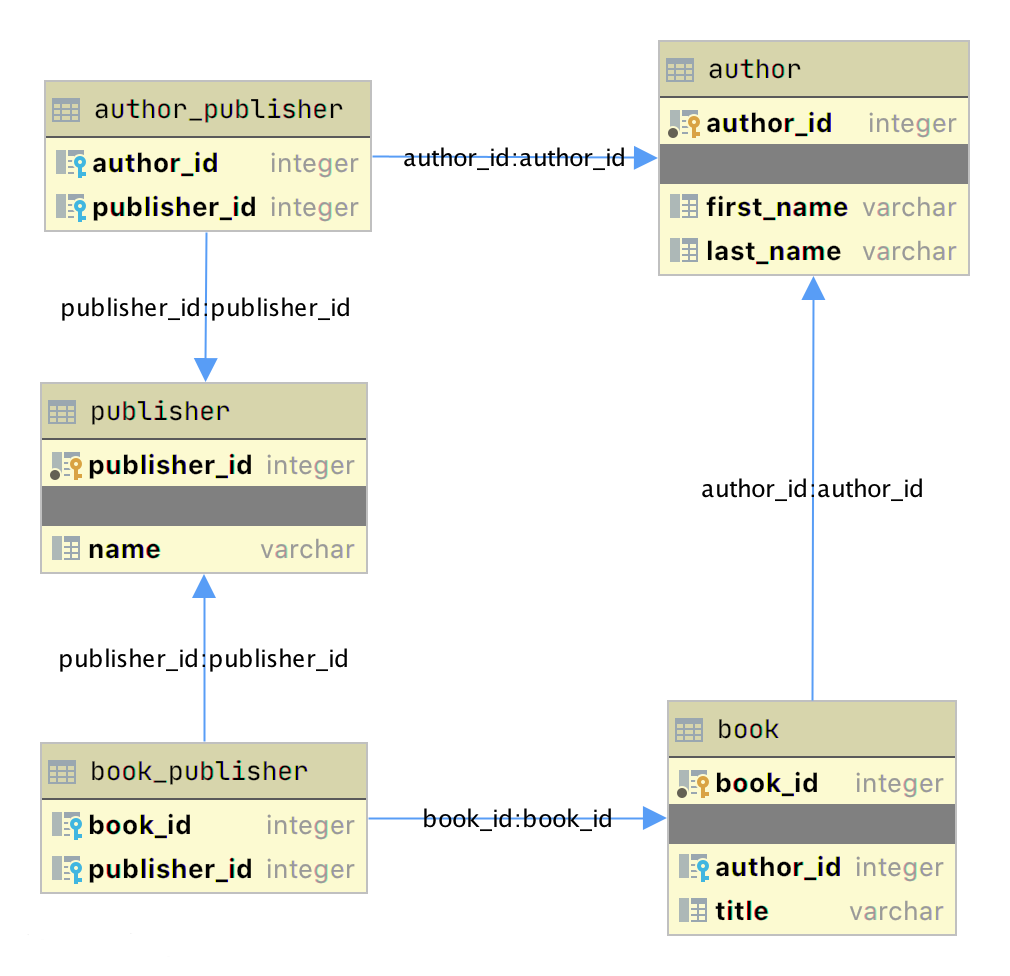](https://files.realpython.com/media/author_book_publisher.fbc88687deeb.png)
|
||
|
||
This diagram presents the table structures in the database and the relationships between them. Each box represents a table and contains the fields defined in the table, with the primary key indicated first if it exists.
|
||
|
||
The arrows show the relationships between the tables connecting a foreign key field in one table to a field, often the primary key, in another table. The table `book_publisher` has two arrows, one connecting it to the `book` table and another connecting it to the `publisher` table. The arrow indicates the many-to-many relationship between the `book` and `publisher` tables. The `author_publisher` table provides the same relationship between `author` and `publisher`.
|
||
|
||
## Working With SQLAlchemy and Python Objects[](https://realpython.com/python-sqlite-sqlalchemy/#working-with-sqlalchemy-and-python-objects "Permanent link")
|
||
|
||
[SQLAlchemy](https://www.sqlalchemy.org/) is a powerful database access tool kit for Python, with its [object-relational mapper (ORM)](https://en.wikipedia.org/wiki/Object-relational_mapping) being one of its most famous components, and the one discussed and used here.
|
||
|
||
When you’re working in an [object-oriented](https://realpython.com/python3-object-oriented-programming/) language like Python, it’s often useful to think in terms of objects. It’s possible to map the results returned by SQL queries to objects, but doing so works against the grain of how the database works. Sticking with the scalar results provided by SQL works against the grain of how Python developers work. This problem is known as [object-relational impedance mismatch](https://en.wikipedia.org/wiki/Object-relational_impedance_mismatch).
|
||
|
||
The ORM provided by SQLAlchemy sits between the SQLite database and your Python program and transforms the data flow between the database engine and Python objects. SQLAlchemy allows you to think in terms of objects and still retain the powerful features of a database engine.
|
||
|
||
### The Model[](https://realpython.com/python-sqlite-sqlalchemy/#the-model "Permanent link")
|
||
|
||
One of the fundamental elements to enable connecting SQLAlchemy to a database is creating a **model**. The model is a [Python class](https://realpython.com/python-classes/) defining the data mapping between the Python objects returned as a result of a database query and the underlying database tables.
|
||
|
||
The entity-relationship diagram displayed earlier shows boxes connected with arrows. The boxes are the tables built with the SQL commands and are what the Python classes will model. The arrows are the relationships between the tables.
|
||
|
||
The models are Python classes inheriting from an SQLAlchemy `Base` class. The `Base` class provides the interface operations between instances of the model and the database table.
|
||
|
||
Below is the `models.py` file that creates the models to represent the `author_book_publisher.db` database:
|
||
|
||
`from sqlalchemy import Column, Integer, String, ForeignKey, Table from sqlalchemy.orm import relationship, backref from sqlalchemy.ext.declarative import declarative_base Base = declarative_base() author_publisher = Table( "author_publisher", Base.metadata, Column("author_id", Integer, ForeignKey("author.author_id")), Column("publisher_id", Integer, ForeignKey("publisher.publisher_id")), ) book_publisher = Table( "book_publisher", Base.metadata, Column("book_id", Integer, ForeignKey("book.book_id")), Column("publisher_id", Integer, ForeignKey("publisher.publisher_id")), ) class Author(Base): __tablename__ = "author" author_id = Column(Integer, primary_key=True) first_name = Column(String) last_name = Column(String) books = relationship("Book", backref=backref("author")) publishers = relationship( "Publisher", secondary=author_publisher, back_populates="authors" ) class Book(Base): __tablename__ = "book" book_id = Column(Integer, primary_key=True) author_id = Column(Integer, ForeignKey("author.author_id")) title = Column(String) publishers = relationship( "Publisher", secondary=book_publisher, back_populates="books" ) class Publisher(Base): __tablename__ = "publisher" publisher_id = Column(Integer, primary_key=True) name = Column(String) authors = relationship( "Author", secondary=author_publisher, back_populates="publishers" ) books = relationship( "Book", secondary=book_publisher, back_populates="publishers" )`
|
||
|
||
Here’s what’s going on in this module:
|
||
|
||
- **Line 1** imports the `Column`, `Integer`, `String`, `ForeignKey`, and `Table` classes from SQLAlchemy, which are used to help define the model attributes.
|
||
|
||
- **Line 2** imports the `relationship()` and `backref` objects, which are used to create the relationships between objects.
|
||
|
||
- **Line 3** imports the `declarative_base` object, which connects the database engine to the SQLAlchemy functionality of the models.
|
||
|
||
- **Line 5** creates the `Base` class, which is what all models inherit from and how they get SQLAlchemy ORM functionality.
|
||
|
||
- **Lines 7 to 12** create the `author_publisher` association table model.
|
||
|
||
- **Lines 14 to 19** create the `book_publisher` association table model.
|
||
|
||
- **Lines 21 to 29** define the `Author` class model to the `author` database table.
|
||
|
||
- **Lines 31 to 38** define the `Book` class model to the `book` database table.
|
||
|
||
- **Lines 40 to 49** define the `Publisher` class model to the `publisher` database table.
|
||
|
||
|
||
The description above shows the mapping of the five tables in the `author_book_publisher.db` database. But it glosses over some SQLAlchemy ORM features, including `Table`, `ForeignKey`, `relationship()`, and `backref`. Let’s get into those now.
|
||
|
||
### `Table` Creates Associations[](https://realpython.com/python-sqlite-sqlalchemy/#table-creates-associations "Permanent link")
|
||
|
||
`author_publisher` and `book_publisher` are both instances of the `Table` class that create the many-to-many association tables used between the `author` and `publisher` tables and the `book` and `publisher` tables, respectively.
|
||
|
||
The SQLAlchemy `Table` class creates a unique instance of an ORM mapped table within the database. The first parameter is the table name as defined in the database, and the second is `Base.metadata`, which provides the connection between the SQLAlchemy functionality and the database engine.
|
||
|
||
The rest of the parameters are instances of the `Column` class defining the table fields by name, their type, and in the example above, an instance of a `ForeignKey`.
|
||
|
||
[Remove ads](https://realpython.com/account/join/)
|
||
|
||
### `ForeignKey` Creates a Connection[](https://realpython.com/python-sqlite-sqlalchemy/#foreignkey-creates-a-connection "Permanent link")
|
||
|
||
The SQLAlchemy **`ForeignKey`** class defines a dependency between two `Column` fields in different tables. A `ForeignKey` is how you make SQLAlchemy aware of the relationships between tables. For example, this line from the `author_publisher` instance creation establishes a foreign key relationship:
|
||
|
||
`Column("author_id", Integer, ForeignKey("author.author_id"))`
|
||
|
||
The statement above tells SQLAlchemy that there’s a column in the `author_publisher` table named `author_id`. The type of that column is `Integer`, and `author_id` is a foreign key related to the primary key in the `author` table.
|
||
|
||
Having both `author_id` and `publisher_id` defined in the `author_publisher` `Table` instance creates the connection from the `author` table to the `publisher` table and vice versa, establishing a many-to-many relationship.
|
||
|
||
### `relationship()` Establishes a Collection[](https://realpython.com/python-sqlite-sqlalchemy/#relationship-establishes-a-collection "Permanent link")
|
||
|
||
Having a `ForeignKey` defines the existence of the relationship between tables but not the collection of books an author can have. Take a look at this line in the `Author` class definition:
|
||
|
||
`books = relationship("Book", backref=backref("author"))`
|
||
|
||
The code above defines a parent-child collection. The `books` attribute being plural (which is not a requirement, just a convention) is an indication that it’s a collection.
|
||
|
||
The first parameter to `relationship()`, the class name `Book` (which is _not_ the table name `book`), is the class to which the `books` attribute is related. The `relationship` informs SQLAlchemy that there’s a relationship between the `Author` and `Book` classes. SQLAlchemy will find the relationship in the `Book` class definition:
|
||
|
||
`author_id = Column(Integer, ForeignKey("author.author_id"))`
|
||
|
||
SQLAlchemy recognizes that this is the `ForeignKey` connection point between the two classes. You’ll get to the `backref` parameter in `relationship()` in a moment.
|
||
|
||
The other relationship in `Author` is to the `Publisher` class. This is created with the following statement in the `Author` class definition:
|
||
|
||
`publishers = relationship( "Publisher", secondary=author_publisher, back_populates="authors" )`
|
||
|
||
Like `books`, the attribute `publishers` indicates a collection of publishers associated with an author. The first parameter, `"Publisher"`, informs SQLAlchemy what the related class is. The second and third parameters are `secondary=author_publisher` and `back_populates="authors"`:
|
||
|
||
- **`secondary`** tells SQLAlchemy that the relationship to the `Publisher` class is through a secondary table, which is the `author_publisher` association table created earlier in `models.py`. The `secondary` parameter makes SQLAlchemy find the `publisher_id` `ForeignKey` defined in the `author_publisher` association table.
|
||
|
||
- **`back_populates`** is a convenience configuration telling SQLAlchemy that there’s a complementary collection in the `Publisher` class called `authors`.
|
||
|
||
|
||
### `backref` Mirrors Attributes[](https://realpython.com/python-sqlite-sqlalchemy/#backref-mirrors-attributes "Permanent link")
|
||
|
||
The **`backref`** parameter of the `books` collection `relationship()` creates an `author` attribute for each `Book` instance. This attribute refers to the parent `Author` that the `Book` instance is related to.
|
||
|
||
For example, if you executed the following Python code, then a `Book` instance would be returned from the SQLAlchemy query. The `Book` instance has attributes that can be used to print out information about the book:
|
||
|
||
`book = session.query(Book).filter_by(Book.title == "The Stand").one_or_none() print(f"Authors name: {book.author.first_name} {book.author.last_name}")`
|
||
|
||
The existence of the `author` attribute in the `Book` above is because of the `backref` definition. A `backref` can be very handy to have when you need to refer to the parent and all you have is a child instance.
|
||
|
||
[Remove ads](https://realpython.com/account/join/)
|
||
|
||
### Queries Answer Questions[](https://realpython.com/python-sqlite-sqlalchemy/#queries-answer-questions "Permanent link")
|
||
|
||
You can make a basic query like `SELECT * FROM author;` in SQLAlchemy like this:
|
||
|
||
`results = session.query(Author).all()`
|
||
|
||
The **`session`** is an SQLAlchemy object used to communicate with SQLite in the Python example programs. Here, you tell the session you want to execute a query against the `Author` model and return all records.
|
||
|
||
At this point, the advantages of using SQLAlchemy instead of plain SQL might not be obvious, especially considering the setup required to create the models representing the database. The `results` returned by the query is where the magic happens. Instead of getting back a list of lists of scalar data, you’ll get back a list of instances of `Author` objects with attributes matching the column names you defined.
|
||
|
||
The `books` and `publishers` collections maintained by SQLAlchemy create a hierarchical list of authors and the books they’ve written as well as the publishers who’ve published them.
|
||
|
||
Behind the scenes, SQLAlchemy turns the object and method calls into SQL statements to execute against the SQLite database engine. SQLAlchemy transforms the data returned by SQL queries into Python objects.
|
||
|
||
With SQLAlchemy, you can perform the more complex aggregation query shown earlier for the list of authors and the number of books they’ve written like this:
|
||
|
||
`author_book_totals = ( session.query( Author.first_name, Author.last_name, func.count(Book.title).label("book_total") ) .join(Book) .group_by(Author.last_name) .order_by(desc("book_total")) .all() )`
|
||
|
||
The query above gets the author’s first and last name, along with a count of the number of books that the author has written. The aggregating `count` used by the `group_by` clause is based on the author’s last name. Finally, the results are sorted in descending order based on the aggregated and aliased `book_total`.
|
||
|
||
### Example Program[](https://realpython.com/python-sqlite-sqlalchemy/#example-program "Permanent link")
|
||
|
||
The example program `examples/example_2/main.py` has the same functionality as `examples/example_1/main.py` but uses SQLAlchemy exclusively to interface with the `author_book_publisher.db` SQLite database. The program is broken up into the `main()` function and the functions it calls:
|
||
|
||
`def main(): """Main entry point of program""" # Connect to the database using SQLAlchemy with resources.path( "project.data", "author_book_publisher.db" ) as sqlite_filepath: engine = create_engine(f"sqlite:///{sqlite_filepath}") Session = sessionmaker() Session.configure(bind=engine) session = Session() # Get the number of books printed by each publisher books_by_publisher = get_books_by_publishers(session, ascending=False) for row in books_by_publisher: print(f"Publisher: {row.name}, total books: {row.total_books}") print() # Get the number of authors each publisher publishes authors_by_publisher = get_authors_by_publishers(session) for row in authors_by_publisher: print(f"Publisher: {row.name}, total authors: {row.total_authors}") print() # Output hierarchical author data authors = get_authors(session) output_author_hierarchy(authors) # Add a new book add_new_book( session, author_name="Stephen King", book_title="The Stand", publisher_name="Random House", ) # Output the updated hierarchical author data authors = get_authors(session) output_author_hierarchy(authors)`
|
||
|
||
This program is a modified version of `examples/example_1/main.py`. Let’s go over the differences:
|
||
|
||
- **Lines 4 to 7** first initialize the `sqlite_filepath` variable to the database file path. Then they create the `engine` variable to communicate with SQLite and the `author_book_publisher.db` database file, which is SQLAlchemy’s access point to the database.
|
||
|
||
- **Line 8** creates the `Session` class from the SQLAlchemy’s `sessionmaker()`.
|
||
|
||
- **Line 9** binds the `Session` to the engine created in line 8.
|
||
|
||
- **Line 10** creates the `session` instance, which is used by the program to communicate with SQLAlchemy.
|
||
|
||
|
||
The rest of the function is similar, except for the replacement of `data` with `session` as the first parameter to all the functions called by `main()`.
|
||
|
||
`get_books_by_publisher()` has been refactored to use SQLAlchemy and the models you defined earlier to get the data requested:
|
||
|
||
`def get_books_by_publishers(session, ascending=True): """Get a list of publishers and the number of books they've published""" if not isinstance(ascending, bool): raise ValueError(f"Sorting value invalid: {ascending}") direction = asc if ascending else desc return ( session.query( Publisher.name, func.count(Book.title).label("total_books") ) .join(Publisher.books) .group_by(Publisher.name) .order_by(direction("total_books")) )`
|
||
|
||
Here’s what the new function, `get_books_by_publishers()`, is doing:
|
||
|
||
- **Line 6** creates the `direction` variable and sets it equal to the SQLAlchemy `desc` or `asc` function depending on the value of the `ascending` parameter.
|
||
|
||
- **Lines 9 to 11** query the `Publisher` table for data to return, which in this case are `Publisher.name` and the aggregate total of `Book` objects associated with an author, aliased to `total_books`.
|
||
|
||
- **Line 12** joins to the `Publisher.books` collection.
|
||
|
||
- **Line 13** aggregates the book counts by the `Publisher.name` attribute.
|
||
|
||
- **Line 14** sorts the output by the book counts according to the operator defined by `direction`.
|
||
|
||
- **Line 15** closes the object, executes the query, and returns the results to the caller.
|
||
|
||
|
||
All the above code expresses what is wanted rather than how it’s to be retrieved. Now instead of using SQL to describe what’s wanted, you’re using Python objects and methods. What’s returned is a list of Python objects instead of a list of tuples of data.
|
||
|
||
`get_authors_by_publisher()` has also been modified to work exclusively with SQLAlchemy. Its functionality is very similar to the previous function, so a function description is omitted:
|
||
|
||
`def get_authors_by_publishers(session, ascending=True): """Get a list of publishers and the number of authors they've published""" if not isinstance(ascending, bool): raise ValueError(f"Sorting value invalid: {ascending}") direction = asc if ascending else desc return ( session.query( Publisher.name, func.count(Author.first_name).label("total_authors"), ) .join(Publisher.authors) .group_by(Publisher.name) .order_by(direction("total_authors")) )`
|
||
|
||
`get_authors()` has been added to get a list of authors sorted by their last names. The result of this query is a list of `Author` objects containing a collection of books. The `Author` objects already contain hierarchical data, so the results don’t have to be reformatted:
|
||
|
||
`def get_authors(session): """Get a list of author objects sorted by last name""" return session.query(Author).order_by(Author.last_name).all()`
|
||
|
||
Like its previous version, `add_new_book()` is relatively complex but straightforward to understand. It determines if a book with the same title, author, and publisher exists in the database already.
|
||
|
||
If the search query finds an exact match, then the function returns. If no book matches the exact search criteria, then it searches to see if the author has written a book using the passed in title. This code exists to prevent duplicate books from being created in the database.
|
||
|
||
If no matching book exists, and the author hasn’t written one with the same title, then a new book is created. The function then retrieves or creates an author and publisher. Once instances of the `Book`, `Author` and `Publisher` exist, the relationships between them are created, and the resulting information is saved to the database:
|
||
|
||
`def add_new_book(session, author_name, book_title, publisher_name): """Adds a new book to the system""" # Get the author's first and last names first_name, _, last_name = author_name.partition(" ") # Check if book exists book = ( session.query(Book) .join(Author) .filter(Book.title == book_title) .filter( and_( Author.first_name == first_name, Author.last_name == last_name ) ) .filter(Book.publishers.any(Publisher.name == publisher_name)) .one_or_none() ) # Does the book by the author and publisher already exist? if book is not None: return # Get the book by the author book = ( session.query(Book) .join(Author) .filter(Book.title == book_title) .filter( and_( Author.first_name == first_name, Author.last_name == last_name ) ) .one_or_none() ) # Create the new book if needed if book is None: book = Book(title=book_title) # Get the author author = ( session.query(Author) .filter( and_( Author.first_name == first_name, Author.last_name == last_name ) ) .one_or_none() ) # Do we need to create the author? if author is None: author = Author(first_name=first_name, last_name=last_name) session.add(author) # Get the publisher publisher = ( session.query(Publisher) .filter(Publisher.name == publisher_name) .one_or_none() ) # Do we need to create the publisher? if publisher is None: publisher = Publisher(name=publisher_name) session.add(publisher) # Initialize the book relationships book.author = author book.publishers.append(publisher) session.add(book) # Commit to the database session.commit()`
|
||
|
||
The code above is relatively long. Let’s break the functionality down to manageable sections:
|
||
|
||
- **Lines 7 to 18** set the `book` variable to an instance of a `Book` if a book with the same title, author, and publisher is found. Otherwise, they set `book` to `None`.
|
||
|
||
- **Lines 20 and 21** determine if the book already exists and return if it does.
|
||
|
||
- **Lines 24 to 37** set the `book` variable to an instance of a `Book` if a book with the same title and author is found. Otherwise, they create a new `Book` instance.
|
||
|
||
- **Lines 40 to 52** set the `author` variable to an existing author, if found, or create a new `Author` instance based on the passed-in author name.
|
||
|
||
- **Lines 55 to 63** set the `publisher` variable to an existing publisher, if found, or create a new `Publisher` instance based on the passed-in publisher name.
|
||
|
||
- **Line 66** sets the `book.author` instance to the `author` instance. This creates the relationship between the author and the book, which SQLAlchemy will create in the database when the session is committed.
|
||
|
||
- **Line 67** adds the `publisher` instance to the `book.publishers` collection. This creates the many-to-many relationship between the `book` and `publisher` tables. SQLAlchemy will create references in the tables as well as in the `book_publisher` association table that connects the two.
|
||
|
||
- **Line 68** adds the `Book` instance to the session, making it part of the session’s unit of work.
|
||
|
||
- **Line 71** commits all the creations and updates to the database.
|
||
|
||
|
||
There are a few things to take note of here. First, there’s is no mention of the `author_publisher` or `book_publisher` association tables in either the queries or the creations and updates. Because of the work you did in `models.py` setting up the relationships, SQLAlchemy can handle connecting objects together and keeping those tables in sync during creations and updates.
|
||
|
||
Second, all the creations and updates happen within the context of the `session` object. None of that activity is touching the database. Only when the `session.commit()` statement executes does the session then go through its [unit of work](https://www.martinfowler.com/eaaCatalog/unitOfWork.html) and commit that work to the database.
|
||
|
||
For example, if a new `Book` instance is created (as in line 37 above), then the book has its attributes initialized except for the `book_id` primary key and `author_id` foreign key. Because no database activity has happened yet, the `book_id` is unknown, and nothing was done in the instantiation of `book` to give it an `author_id`.
|
||
|
||
When `session.commit()` is executed, one of the things it will do is insert `book` into the database, at which point the database will create the `book_id` primary key. The session will then initialize the `book.book_id` value with the primary key value created by the database engine.
|
||
|
||
`session.commit()` is also aware of the insertion of the `Book` instance in the `author.books` collection. The `author` object’s `author_id` primary key will be added to the `Book` instance appended to the `author.books` collection as the `author_id` foreign key.
|
||
|
||
[Remove ads](https://realpython.com/account/join/)
|
||
|
||
## Providing Access to Multiple Users[](https://realpython.com/python-sqlite-sqlalchemy/#providing-access-to-multiple-users "Permanent link")
|
||
|
||
To this point, you’ve seen how to use pandas, SQLite, and SQLAlchemy to access the same data in different ways. For the relatively straightforward use case of the author, book, and publisher data, it could still be a toss-up whether you should use a database.
|
||
|
||
One deciding factor when choosing between using a flat file or a database is data and relationship complexity. If the data for each entity is complicated and contains many relationships between the entities, then creating and maintaining it in a flat file might become more difficult.
|
||
|
||
Another factor to consider is whether you want to share the data between multiple users. The solution to this problem might be as simple as using a [sneakernet](https://en.wikipedia.org/wiki/Sneakernet) to physically move data between users. Moving data files around this way has the advantage of ease of use, but the data can quickly get out of sync when changes are made.
|
||
|
||
The problem of keeping the data consistent for all users becomes even more difficult if the users are remote and want to access the data across networks. Even when you’re limited to a single language like Python and using pandas to access the data, network file locking isn’t sufficient to ensure the data doesn’t get corrupted.
|
||
|
||
Providing the data through a server application and a user interface alleviates this problem. The server is the only application that needs file-level access to the database. By using a database, the server can take advantage of SQL to access the data using a consistent interface no matter what programming language the server uses.
|
||
|
||
The last example program demonstrates this by providing a web application and user interface to the [Chinook](https://www.sqlitetutorial.net/sqlite-sample-database/) sample SQLite database. Peter Stark generously maintains the Chinook database as part of the [SQLite Tutorial](https://www.sqlitetutorial.net/) site. If you’d like to learn more about SQLite and SQL in general, then the site is a great resource.
|
||
|
||
The Chinook database provides artist, music, and playlist information along the lines of a simplified [Spotify](https://www.spotify.com/). The database is part of the example code project in the `project/data` folder.
|
||
|
||
## Using Flask With Python, SQLite, and SQLAlchemy[](https://realpython.com/python-sqlite-sqlalchemy/#using-flask-with-python-sqlite-and-sqlalchemy "Permanent link")
|
||
|
||
The `examples/example_3/chinook_server.py` program creates a [Flask](https://flask.palletsprojects.com/en/1.1.x/) application that you can interact with using a browser. The application makes use of the following technologies:
|
||
|
||
- [**Flask Blueprint**](https://flask.palletsprojects.com/en/1.1.x/blueprints/) is part of Flask and provides a good way to follow the [separation of concerns](https://realpython.com/flask-blueprint/) design principle and create distinct modules to contain functionality.
|
||
|
||
- [**Flask SQLAlchemy**](https://pypi.org/project/Flask-SQLAlchemy/) is an extension for Flask that adds support for SQLAlchemy in your web applications.
|
||
|
||
- [**Flask_Bootstrap4**](https://pypi.org/project/Flask-Bootstrap4/) packages the [Bootstrap](https://getbootstrap.com/) front-end tool kit, integrating it with your Flask web applications.
|
||
|
||
- [**Flask_WTF**](https://pypi.org/project/Flask-WTF/) extends Flask with [WTForms](https://wtforms.readthedocs.io/en/2.3.x/), giving your web applications a useful way to generate and validate web forms.
|
||
|
||
- [**python_dotenv**](https://pypi.org/project/python-dotenv/) is a Python module that an application uses to read environment variables from a file and keep sensitive information out of program code.
|
||
|
||
|
||
Though not necessary for this example, a `.env` file holds the environment variables for the application. The `.env` file exists to contain sensitive information like passwords, which you should keep out of your code files. However, the content of the project `.env` file is shown below since it doesn’t contain any sensitive data:
|
||
|
||
`SECRET_KEY = "you-will-never-guess" SQLALCHEMY_TRACK_MODIFICATIONS = False SQLAlCHEMY_ECHO = False DEBUG = True`
|
||
|
||
The example application is fairly large, and only some of it is relevant to this tutorial. For this reason, examining and learning from the code is left as an exercise for the reader. That said, you can take a look at an animated screen capture of the application below, followed by the HTML that renders the home page and the Python Flask route that provides the dynamic data.
|
||
|
||
Here’s the application in action, navigating through various menus and features:
|
||
|
||
[](https://files.realpython.com/media/python-sqlite-sqlalchemy-in-action.8fcee355cc31.gif)
|
||
|
||
The animated screen capture starts on the application home page, styled using [Bootstrap 4](https://getbootstrap.com/). The page displays the artists in the database, sorted in ascending order. The remainder of the screen capture presents the results of clicking on the displayed links or navigating around the application from the top-level menu.
|
||
|
||
Here’s the [Jinja2](https://realpython.com/primer-on-jinja-templating/) HTML template that generates the home page of the application:
|
||
|
||
`{% extends "base.html" %} {% block content %} <div class="container-fluid"> <div class="m-4"> <div class="card" style="width: 18rem;"> <div class="card-header">Create New Artist</div> <div class="card-body"> <form method="POST" action="{{url_for('artists_bp.artists')}}"> {{ form.csrf_token }} {{ render_field(form.name, placeholder=form.name.label.text) }} <button type="submit" class="btn btn-primary">Create</button> </form> </div> </div> <table class="table table-striped table-bordered table-hover table-sm"> <caption>List of Artists</caption> <thead> <tr> <th>Artist Name</th> </tr> </thead> <tbody> {% for artist in artists %} <tr> <td> <a href="{{url_for('albums_bp.albums', artist_id=artist.artist_id)}}"> {{ artist.name }} </a> </td> </tr> {% endfor %} </tbody> </table> </div> </div> {% endblock %}`
|
||
|
||
Here’s what’s going on in this Jinja2 template code:
|
||
|
||
- **Line 1** uses Jinja2 template inheritance to build this template from the `base.html` template. The `base.html` template contains all the HTML5 boilerplate code as well as the Bootstrap navigation bar consistent across all pages of the site.
|
||
|
||
- **Lines 3 to 37** contain the block content of the page, which is incorporated into the Jinja2 macro of the same name in the `base.html` base template.
|
||
|
||
- **Lines 9 to 13** render the form to create a new artist. This uses the features of [Flask-WTF](https://pypi.org/project/Flask-WTF/) to generate the form.
|
||
|
||
- **Lines 24 to 32** create a `for` loop that renders the table of artist names.
|
||
|
||
- **Lines 27 to 29** render the artist name as a link to the artist’s album page showing the songs associated with a particular artist.
|
||
|
||
|
||
Here’s the Python route that renders the page:
|
||
|
||
`from flask import Blueprint, render_template, redirect, url_for from flask_wtf import FlaskForm from wtforms import StringField from wtforms.validators import InputRequired, ValidationError from app import db from app.models import Artist # Set up the blueprint artists_bp = Blueprint( "artists_bp", __name__, template_folder="templates", static_folder="static" ) def does_artist_exist(form, field): artist = ( db.session.query(Artist) .filter(Artist.name == field.data) .one_or_none() ) if artist is not None: raise ValidationError("Artist already exists", field.data) class CreateArtistForm(FlaskForm): name = StringField( label="Artist's Name", validators=[InputRequired(), does_artist_exist] ) @artists_bp.route("/") @artists_bp.route("/artists", methods=["GET", "POST"]) def artists(): form = CreateArtistForm() # Is the form valid? if form.validate_on_submit(): # Create new artist artist = Artist(name=form.name.data) db.session.add(artist) db.session.commit() return redirect(url_for("artists_bp.artists")) artists = db.session.query(Artist).order_by(Artist.name).all() return render_template("artists.html", artists=artists, form=form,)`
|
||
|
||
Let’s go over what the above code is doing:
|
||
|
||
- **Lines 1 to 6** import all the modules necessary to render the page and initialize forms with data from the database.
|
||
|
||
- **Lines 9 to 11** create the blueprint for the artists page.
|
||
|
||
- **Lines 13 to 20** create a custom validator function for the Flask-WTF forms to make sure a request to create a new artist doesn’t conflict with an already existing artist.
|
||
|
||
- **Lines 22 to 25** create the form class to handle the artist form rendered in the browser and provide validation of the form field inputs.
|
||
|
||
- **Lines 27 to 28** connect two routes to the `artists()` function they decorate.
|
||
|
||
- **Line 30** creates an instance of the `CreateArtistForm()` class.
|
||
|
||
- **Line 33** determines if the page was requested through the HTTP methods GET or POST (submit). If it was a POST, then it also validates the fields of the form and informs the user if the fields are invalid.
|
||
|
||
- **Lines 35 to 37** create a new artist object, add it to the SQLAlchemy session, and commit the artist object to the database, persisting it.
|
||
|
||
- **Line 38** redirects back to the artists page, which will be rerendered with the newly created artist.
|
||
|
||
- **Line 40** runs an SQLAlchemy query to get all the artists in the database and sort them by `Artist.name`.
|
||
|
||
- **Line 41** renders the artists page if the HTTP request method was a GET.
|
||
|
||
|
||
You can see that a great deal of functionality is created by a reasonably small amount of code.
|
||
|
||
[Remove ads](https://realpython.com/account/join/)
|
||
|
||
## Creating a REST API Server[](https://realpython.com/python-sqlite-sqlalchemy/#creating-a-rest-api-server "Permanent link")
|
||
|
||
You can also create a web server providing a [REST](https://en.wikipedia.org/wiki/Representational_state_transfer) API. This kind of server offers URL endpoints responding with data, often in [JSON](https://en.wikipedia.org/wiki/JSON) format. A server providing REST API endpoints can be used by JavaScript single-page web applications through the use of AJAX HTTP requests.
|
||
|
||
Flask is an excellent tool for creating REST applications. For a multi-part series of tutorials about using Flask, Connexion, and SQLAlchemy to create REST applications, check out [Python REST APIs With Flask, Connexion, and SQLAlchemy](https://realpython.com/flask-connexion-rest-api/).
|
||
|
||
If you’re a fan of Django and are interested in creating REST APIs, then check out [Django Rest Framework – An Introduction](https://realpython.com/django-rest-framework-quick-start/) and [Create a Super Basic REST API with Django Tastypie](https://realpython.com/create-a-super-basic-rest-api-with-django-tastypie/).
|
||
|
||
**Note:** It’s reasonable to ask if SQLite is the right choice as the database backend to a web application. The [SQLite website](https://www.sqlite.org/whentouse.html) states that SQLite is a good choice for sites that serve around 100,000 hits per day. If your site gets more daily hits, the first thing to say is congratulations!
|
||
|
||
Beyond that, if you’ve implemented your website with SQLAlchemy, then it’s possible to move the data from SQLite to another database such as [MySQL](https://realpython.com/python-mysql/) or PostgreSQL. For a comparison of SQLite, MySQL, and PostgreSQL that will help you make decisions about which one will serve your application best, check out [Introduction to Python SQL Libraries](https://realpython.com/python-sql-libraries/).
|
||
|
||
It’s well worth considering SQLite for your Python application, no matter what it is. Using a database gives your application versatility, and it might create surprising opportunities to add additional features.
|
||
|
||
## Conclusion[](https://realpython.com/python-sqlite-sqlalchemy/#conclusion "Permanent link")
|
||
|
||
You’ve covered a lot of ground in this tutorial about databases, SQLite, SQL, and SQLAlchemy! You’ve used these tools to move data contained in flat files to an SQLite database, access the data with SQL and SQLAlchemy, and provide that data through a web server.
|
||
|
||
**In this tutorial, you’ve learned:**
|
||
|
||
- Why an **SQLite database** can be a compelling alternative to flat-file data storage
|
||
- How to **normalize data** to reduce data redundancy and increase data integrity
|
||
- How to use **SQLAlchemy** to work with databases in an object-oriented manner
|
||
- How to build a **web application** to serve a database to multiple users
|
||
|
||
Working with databases is a powerful abstraction for working with data that adds significant functionality to your Python programs and allows you to ask interesting questions of your data.
|
||
|
||
You can get all of the code and data you saw in this tutorial at the link below:
|
||
|
||
**Download the sample code:** [Click here to get the code you’ll use](https://realpython.com/bonus/sqlite-sqlalchemy-code/) to learn about data management with SQLite and SQLAlchemy in this tutorial.
|
||
|
||
## Further Reading[](https://realpython.com/python-sqlite-sqlalchemy/#further-reading "Permanent link")
|
||
|
||
This tutorial is an introduction to using databases, SQL, and SQLAlchemy, but there’s much more to learn about these subjects. These are powerful, sophisticated tools that no single tutorial can cover adequately. Here are some resources for additional information to expand your skills:
|
||
|
||
- If your application will expose the database to users, then avoiding SQL injection attacks is an important skill. For more information, check out [Preventing SQL Injection Attacks With Python](https://realpython.com/prevent-python-sql-injection/).
|
||
|
||
- Providing web access to a database is common in web-based single-page applications. To learn how, check out [Python REST APIs With Flask, Connexion, and SQLAlchemy – Part 2](https://realpython.com/flask-connexion-rest-api-part-2/).
|
||
|
||
- Preparing for [data engineering](https://realpython.com/python-data-engineer/) job interviews gives you a leg up in your career. To get started, check out [Data Engineer Interview Questions With Python](https://realpython.com/data-engineer-interview-questions-python/).
|
||
|
||
- Migrating data and being able to roll back using Flask with Postgres and SQLAlchemy is an integral part of the Software Development Life Cycle (SDLC). You can learn more about it by checking out [Flask by Example – Setting up Postgres, SQLAlchemy, and Alembic](https://realpython.com/flask-by-example-part-2-postgres-sqlalchemy-and-alembic/).
|
||
|
||
---
|
||
# Anhang: Promt
|
||
```text
|
||
Gib mir eine umfassende und detaillierte Übersicht zum Python Paket "SQLAlchemy".
|
||
* Wie ist die grundsätzliche Idee?
|
||
* Welche Abgrenzung zu ähnlichen oder verwandten Vorgehensweisen, Paketen oder Pradigmen gibt es
|
||
* Welche Probleme werden gelöst?
|
||
* Welche Herausforderungen gibt es?
|
||
* Ergänze Erläuterungen mit praxisnahen Beispielen.
|
||
``` |